Research documents
Headings and styles, equations, tables, citations, bibliographies, cross-references, contents, notes, page sections, headers, and footers. These are the structures that make a brief or paper useful after export.
Languages & compilers
Write in Typst. Share editable Word documents and PowerPoint decks. Bring Office and LaTeX back into source.
Recorded result
Explore the exampleA document is more useful when its structure survives the trip. I want to write with the control of a programming language, reuse the same content and layout rules, and still give someone a Word file they can edit. That puts compiler design right next to an everyday problem: keeping equations, tables, references, and review edits meaningful across formats.
My Typst fork includes native DOCX and PPTX export, Office import, fidelity reports, and a Word review workflow that returns text edits to the original source. The browser exporter handles complete local projects. My local Typst Studio adds visual edits, reusable briefs, native charts, and shared data with source evidence. My Tylax fork covers LaTeX conversion and its artifact contracts. The examples below put that work beside its recorded validation.
Typst combines a typesetter with a programming language. Functions and templates make the layout reusable. The Office work extends that control to the files people exchange: briefs, papers, tables, and slide decks.
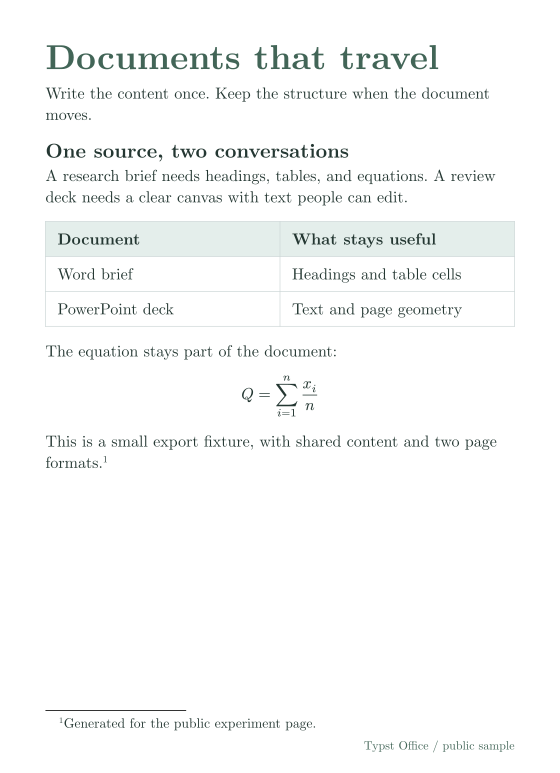
Word lays out a stream of paragraphs. The exporter reads Typst’s document structure and creates native headings, lists, table cells, references, footnotes, and equations. Word can then edit those objects.
The sample includes 13 native paragraphs, one Word table, and one OMML equation. The preview shows Typst’s reference page. The download is the actual Office export.
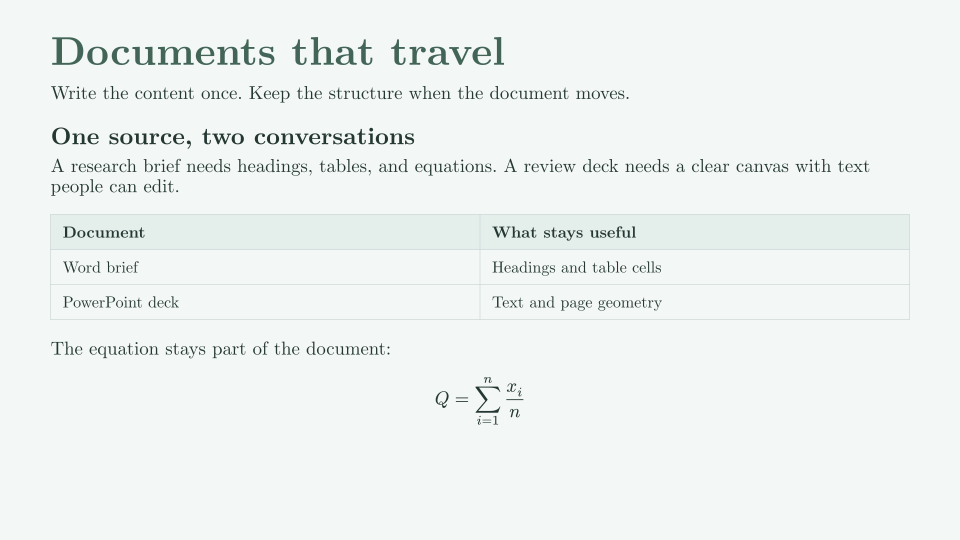
PowerPoint starts with coordinates. The exporter walks Typst’s laid-out page and places text, shapes, images, tables, and equations on the slide. Compiler tags recover the structure inside that geometry.
This 16:9 sample reuses the brief’s content. Its PPTX contains six native text shapes, 13 text runs, one DrawingML table, and one OMML equation. Recipients can edit the text and table.
The importers read arbitrary DOCX and PPTX packages. They resolve styles, numbering, media, slide masters, and theme colors before they produce Typst source and extracted assets.
DOCX import recovers a flowing document. PPTX import preserves authored coordinates by default and produces Touying slides. A second mode promotes recognized placeholders into source that follows the slide’s content flow.
The loss report names each known approximation or dropped object. Charts can become data tables or plots. Comments and revisions survive as metadata. EMF/WMF media, animations, transitions, and embedded OLE objects remain gaps.
Read the import support and commandsThe review exporter tags source regions and keeps a separate baseline. After a reviewer edits the DOCX, a three-way comparison finds the Word change, the original text, and any local source edits.
Plain source text in headings, paragraphs, lists, table cells, headers, footers, and footnotes can return to its original location. Existing style wrappers stay intact. Repeated review cycles retain the same workflow.
Formatting changes, structural changes, and ambiguous source matches produce conflicts. The importer escapes literal text before it writes Typst. Word comments stay review annotations.
Read the review workflowThe estimate is 0.20.The estimate is 0.20 0.24.The estimate is 0.20.The estimate is 0.24.Retain surrounding Typst structureBoth samples include the same content.typ. Their entrypoints set the page geometry and type. Rust/WASM produced the DOCX and PPTX on October 10, 2026. XML and internal relationship checks passed.
#set page(width: 420pt, height: 580pt)
#include "content.typ"

// The slide entrypoint uses the same content.
#set page(width: 720pt, height: 405pt)
#include "content.typ"
Typst 0.15.0 produced the SVG and PDF references. These renders show the source layout. Office render, edit, and reopen checks remain separate.
My local Typst Studio connects visual annotations to source edits. A selection retains the document revision and component identity. A change compiles before it becomes the new document. Undo restores the edit and its data together.
Company briefs and tearsheets use reusable components. Shared datasets bind metrics, charts, and tables to the same values. Source records retain dates, excerpts, and evidence. A manual override remains visible.
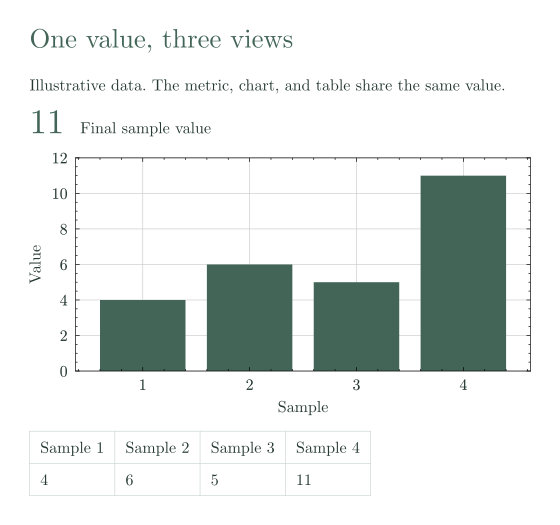
Native Lilaq charts compile inside Typst. The small example here shows why shared data matters: one value changes the metric, bar, and table cell together.
These are two recorded Typst builds with illustrative data. The Studio service uses Python, a Rust parser, and a web viewer. Typst renders the native charts.
Inspect the chart source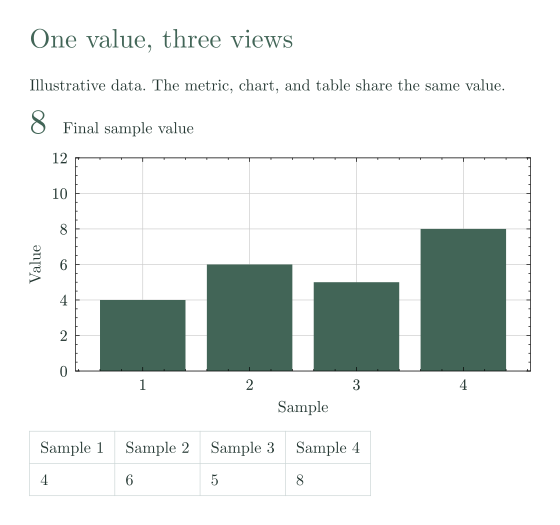
Headings and styles, equations, tables, citations, bibliographies, cross-references, contents, notes, page sections, headers, and footers. These are the structures that make a brief or paper useful after export.
Native text, shapes, gradients, images, tables, equations, placeholders, and speaker notes. SVG carries a PNG compatibility fallback. Complex diagrams and transforms use positioned images.
Rust runs as WebAssembly. A source file, project folder, or ZIP stays in browser memory. Relative imports, binary assets, bundled fonts, and vendored packages keep their paths. The hosted demo exports DOCX and PPTX.
Reports distinguish native, approximate, rasterized, and dropped content. CLI limits can reject an export with too many recorded losses. Native paragraph reflow and font substitution still require a check in Office.
The fork also contains a typed Pandoc JSON target. It evaluates Typst before export, but remains incomplete and unsupported. The HarfRust and line-break performance work lives on a separate branch. This page makes no speed claim for that branch.
Read the Pandoc status| Work | Recorded result | Next gap |
|---|---|---|
| Office samples October 10, 2026 | Fresh DOCX and PPTX exports. Editable text and OMML math appear in the package. XML and internal relationships pass. | Render, edit, save, and reopen these files in Word and PowerPoint. |
| Compiler integration October 2, 2026 | Upstream merge, 91/91 Office construct cases, and schema checks for two DOCX fixtures and one PPTX fixture. | Refresh corpus and native Office results. Package checks do not measure visual fidelity. |
| Package and CLI coverage October 2 audit | 343 DOCX export, 77 PPTX export, 95 DOCX import, and 18 PPTX import cases retained. Review tests cover two complete edit cycles. | PowerPoint text-box baselines and native table rendering remain specific fidelity issues. |
| Typst Studio Local working project | Source-owned annotations, reusable components, native Lilaq charts, guarded data edits, provenance, and Undo. | The website shows two recorded renders. The live authoring controls run in the local Studio tool. |
| LaTeX conversion October 2 review | Tylax’s typed compiler, complete output bundles, bounded native verification, and worker-based browser conversion. 1,745 Rust tests passed in that record. | Full-document source/target visual acceptance. The three older examples below retain their Degraded grade. |
Compiler evidencePackage and CLI auditTypst forkBrowser exporter source
Choose a fraction, matrix, or sum and compare its LaTeX source, converted Typst, and preview.
The source becomes a Typst document with a rendered preview. Tylax reports Degraded because amsmath has no active handler, even though the converted math compiles.

\documentclass{article}
\usepackage{amsmath}
\begin{document}
\[\frac{a}{b} + \sqrt{x}\]
\end{document}
#set text(font: "New Computer Modern", size: 10pt)
#set par(leading: 2pt)

$ frac(a, b)+sqrt(x) $
The source becomes a Typst document with a rendered preview. Tylax reports Degraded because amsmath has no active handler, even though the converted math compiles.

\documentclass{article}
\usepackage{amsmath}
\begin{document}
\[\begin{pmatrix}1 & 2 \\ 3 & 4\end{pmatrix}\]
\end{document}
#set text(font: "New Computer Modern", size: 10pt)
#set par(leading: 2pt)

$ mat(delim: "(", 1, 2; 3, 4) $
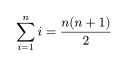
The source becomes a Typst document with a rendered preview. Tylax reports Degraded because amsmath has no active handler, even though the converted math compiles.
\documentclass{article}
\usepackage{amsmath}
\begin{document}
\[\sum_{i=1}^{n} i = \frac{n(n+1)}{2}\]
\end{document}
#set text(font: "New Computer Modern", size: 10pt)
#set par(leading: 2pt)

$ sum_(i = 1)^(n)i=frac(n ( n + 1 ) , 2) $
These retained examples record Tylax 0.3.6 output and Typst 0.15.1 previews. Their Degraded grade preserves the missing amsmath-handler diagnostic from that recording. The October architecture work above has a separate evidence record. SciPenAI authors Tylax.
Reference: Tylax by SciPenAI. The examples record output from the native Rust converter and preserve its artifact grades.Read the original source
Rerun the document corpus and native Office render, edit, and reopen checks against the current fork. Fix the remaining PowerPoint text baselines and table rendering cases. Complete the browser import and review paths, and verify Tylax output with its target compiler.
What survives when a document moves between source, a printed page, and an editable Office file?
Typst Office export and import, Word review, document tooling, and Tylax conversion share this page. Public samples contain original demonstration content.
Explore Word, PowerPoint, Office import, and source review. Download the generated files and compare the LaTeX examples.
Rust implements the compiler, Office exporters, importers, and converter. The browser exporter runs Rust as WebAssembly. This page uses native HTML controls and Typst-rendered SVG previews.
Typst is the upstream compiler. My community fork adds Office interoperability. SciPenAI authors Tylax. My Tylax fork covers semantic conversion and validation.